Born from real field work.
SelectB started from the slowest part of wildlife photography: returning home with thousands of frames and finding the few worth editing.
Read the story
Wildlife photography culling software for bird and safari photographers.
AI recommends. You decide. SelectB helps wildlife photographers review large RAW and JPEG shoots, compare burst sequences and move the strongest frames toward Lightroom without surrendering creative control.
Built for the wildlife workflow
Generic photo review tools are not designed around long bursts, hidden subjects, clipped wings, small birds, difficult backgrounds and thousands of near-identical RAW files. SelectB is being built specifically for wildlife photography culling while keeping every final decision with the photographer.
Why SelectB
SelectB focuses on sequence review, difficult subjects and photographer control—not generic image sorting.
Local review workflow with no automatic upload of your original photographs.
Designed for large folders from Nikon, Canon, Sony and other camera systems.
Compare frames from the same sighting or burst without hiding the rest.
Best-of-sequence is visible, explainable and separate from final selection.
Review focus, exposure, composition and AI reasons before choosing.
XMP ratings, selected folders, review folders, reject folders and CSV reports.
Every AI suggestion can be changed before export.
Track decisions, scores, sequence groups and export results.
Owner and community feedback can help future AI models learn from real mistakes.
Product
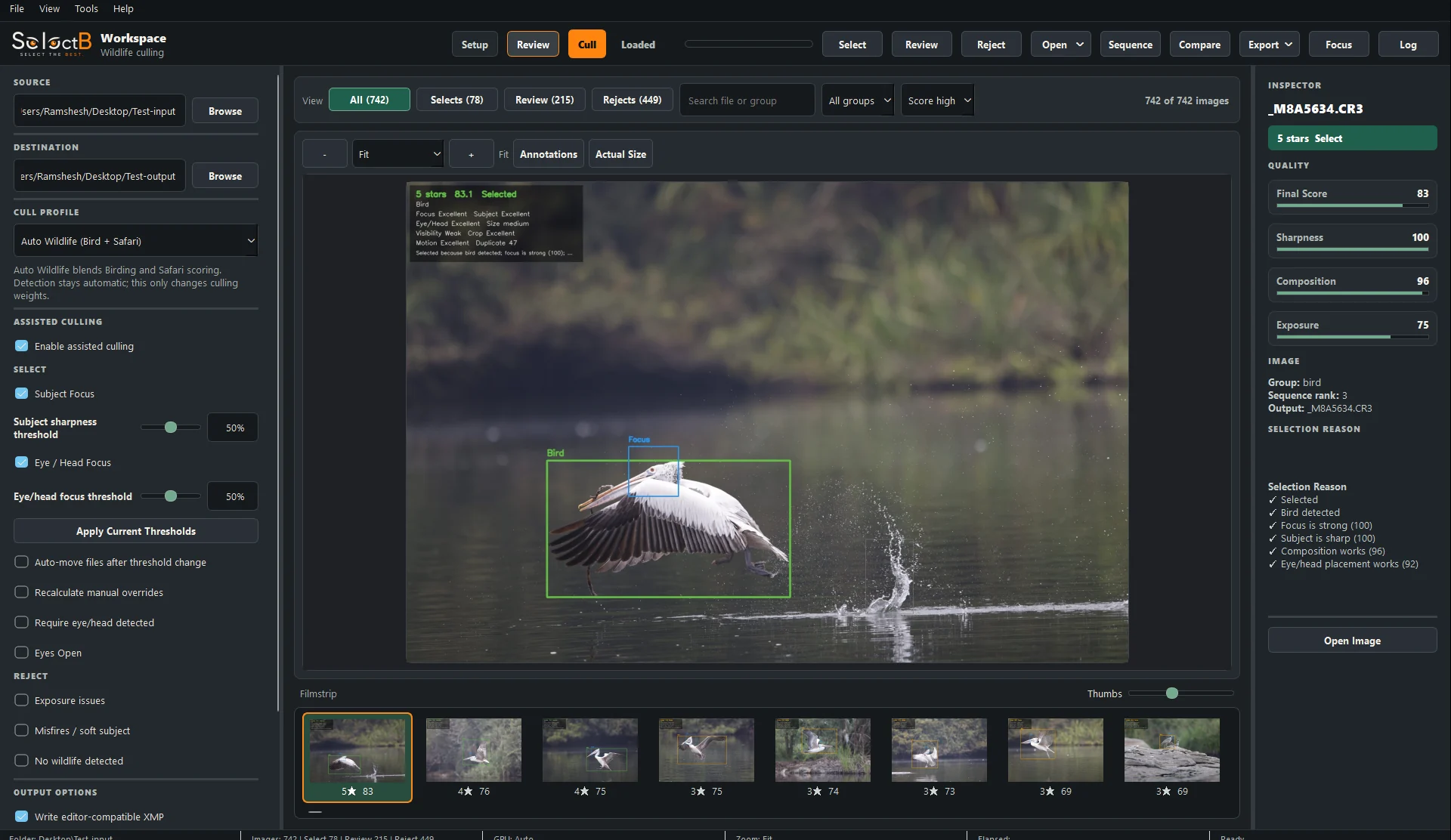
The app shows the recommendation, the sequence, the image context and the final decision before anything is exported.

01 / Review workspace
Review AI scores, image status, sequence information and annotations in one workspace.
Outcome: faster first-pass review without hiding the reasoning.

02 / Compare mode
Side-by-side comparison helps you choose between similar sharp frames without jumping between files.
Outcome: choose the better frame without flipping back and forth.

03 / Sequence review
Similar frames are grouped so the strongest image can be suggested while all alternates remain visible.
Outcome: review a sequence once instead of judging every near-duplicate separately.

04 / Filmstrip navigation
The filmstrip gives visual context while you inspect each image in the main preview.
Outcome: keep your place across hundreds or thousands of frames.
Photographer Control
SelectB is designed to reduce repetitive review work, not replace judgment. Every recommendation remains visible and reversible.
Wildlife-specific problems
Wildlife culling needs to account for real field conditions that generic photo sorters often miss.
Subject size, focus and visibility matter more than generic image scores.
Obstruction and head visibility can decide whether an image is usable.
Sequence review reduces repetitive comparisons without hiding choices.
The app must avoid choosing the wrong bird or a soft background subject.

SelectB started from the slowest part of wildlife photography: returning home with thousands of frames and finding the few worth editing.
Read the storyRoadmap
Pricing is intentionally not shown yet. Early Access is for validation, feedback and private beta selection.
Review, compare, group sequences and export clean selections.
Improving wrong-subject, eye/head, obstruction and clipping logic.
Real photographers validate the workflow before commercial release.
Early Access
Private beta invitations will be sent in batches. Early Access members will receive launch pricing details before the commercial release.